


前提条件
安装 node.js (以 npm 为例)
安装 git
创建飞书企业自建应用,并记录凭证信息
智谱 GLM API Key
安装 OpenClaw
通过 npm 安装
npm install -g openclaw@latest输出如下即成功
# npm install -g openclaw@latest
npm warn deprecated inflight@1.0.6: This module is not supported, and leaks memory. Do not use it. Check out lru-cache if you want a good and tested way to coalesce async requests by a key value, which is much more comprehensive and powerful.
npm warn deprecated are-we-there-yet@2.0.0: This package is no longer supported.
npm warn deprecated gauge@3.0.2: This package is no longer supported.
npm warn deprecated rimraf@3.0.2: Rimraf versions prior to v4 are no longer supported
npm warn deprecated npmlog@5.0.1: This package is no longer supported.
npm warn deprecated glob@7.2.3: Old versions of glob are not supported, and contain widely publicized security vulnerabilities, which have been fixed in the current version. Please update. Support for old versions may be purchased (at exorbitant rates) by contacting i@izs.me
npm warn deprecated tar@6.2.1: Old versions of tar are not supported, and contain widely publicized security vulnerabilities, which have been fixed in the current version. Please update. Support for old versions may be purchased (at exorbitant rates) by contacting i@izs.me
npm warn deprecated glob@10.5.0: Old versions of glob are not supported, and contain widely publicized security vulnerabilities, which have been fixed in the current version. Please update. Support for old versions may be purchased (at exorbitant rates) by contacting i@izs.me

added 653 packages in 3m

128 packages are looking for funding
  run `npm fund` for details
初始化 OpenClaw
openclaw onboard --install-daemon等待一阵,会进入交互:
通过方向键,切换到 Yes 并回车
◆  I understand this is personal-by-default and shared/multi-user use requires lock-down. Continue?
│  ● Yes / ○ No
选择 QuickStart,快速配置
◆  Onboarding mode
│  ● QuickStart (Configure details later via openclaw configure.)
│  ○ Manual
GLM 选择 Z.AI
◆  Model/auth provider
│  ○ OpenAI
│  ○ Anthropic
│  ○ ...
│  ● Z.AI (GLM Coding Plan / Global / CN)
│  ○ ...
│  ○ Skip for now
根据自己的模型计划选择,作者是Coding-Plan,所以选择 Coding-plan-CN
◆  Z.AI auth method
│  ○ Coding-Plan-Global
│  ● Coding-Plan-CN (GLM Coding Plan CN (open.bigmodel.cn))
│  ○ Global
│  ○ CN
│  ○ Back
选择 Paste API key now
◆  How do you want to provide this API key?
│  ● Paste API key now (Stores the key directly in OpenClaw config)
│ ○ Use external secret provider输入在智谱AI开放平台生成的 API Key
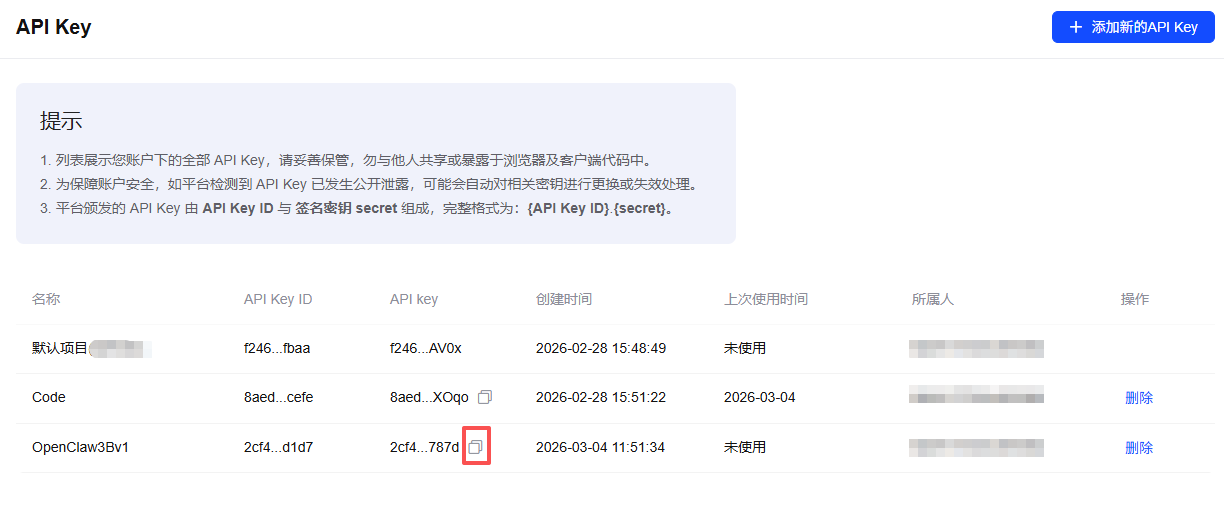
◆  Enter Z.AI API key
│  ********
模型选择,设置默认使用模型(当前选择 GLM-5)
◇  Model configured ───────────────╮
│                                  │
│  Default model set to zai/glm-5  │
│                                  │
├──────────────────────────────────╯
│
◆  Default model
│  ● Keep current (zai/glm-5)
│  ○ Enter model manually
│  ○ zai/glm-4.5
│  ○ zai/glm-4.5-air
│  ○ zai/glm-4.5-flash
│  ○ zai/glm-4.5v
│  ○ zai/glm-4.6
│  ○ zai/glm-4.6v
│  ○ zai/glm-4.7
│  ○ zai/glm-4.7-flash
│  ○ zai/glm-4.7-flashx
│  ○ zai/glm-5
Channel 选择,选择 Feishu (飞书)
◆  Select channel (QuickStart)
│  ○ Telegram (Bot API)
│  ○ WhatsApp (QR link)
│  ○ Discord (Bot API)
│  ○ IRC (Server + Nick)
│  ○ Google Chat (Chat API)
│  ○ Slack (Socket Mode)
│  ○ Signal (signal-cli)
│  ○ iMessage (imsg)
│  ● Feishu/Lark (飞书) (plugin · install)
│  ○ Nostr (NIP-04 DMs)
│  ○ Microsoft Teams (Bot Framework)
│  ○ Mattermost (plugin)
│  ○ Nextcloud Talk (self-hosted)
│  ○ Matrix (plugin)
│  ○ BlueBubbles (macOS app)
│  ○ LINE (Messaging API)
│  ○ Zalo (Bot API)
│  ○ Zalo (Personal Account)
│  ○ Synology Chat (Webhook)
│  ○ Tlon (Urbit)
│  ○ Skip for now
提示安装插件,选择 Download
◆  Install Feishu plugin?
│  ● Download from npm (@openclaw/feishu)
│  ○ Skip for now
选择 Enter App Secret 输入飞书应用凭证
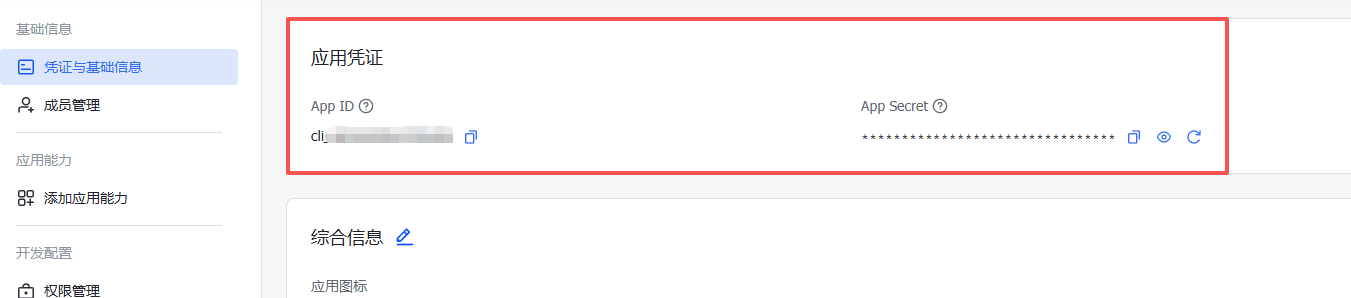
Downloading @openclaw/feishu…
Extracting /tmp/openclaw-npm-pack-CO7veN/openclaw-feishu-2026.3.2.tgz…
Plugin "feishu" has 1 suspicious code pattern(s). Run "openclaw security audit --deep" for details.
Installing to /root/.openclaw/extensions/feishu…
Installing plugin dependencies…
04:20:02 [plugins] plugins.allow is empty; discovered non-bundled plugins may auto-load: feishu (/root/.openclaw/extensions/feishu/index.ts). Set plugins.allow to explicit trusted ids.
│
◇  Feishu credentials ──────────────────────────────────────────────────────────────╮
│                                                                                   │
│  1) Go to Feishu Open Platform (open.feishu.cn)                                   │
│  2) Create a self-built app                                                       │
│  3) Get App ID and App Secret from Credentials page                               │
│  4) Enable required permissions: im:message, im:chat, contact:user.base:readonly  │
│  5) Publish the app or add it to a test group                                     │
│  Tip: you can also set FEISHU_APP_ID / FEISHU_APP_SECRET env vars.                │
│  Docs: feishu                 │
│                                                                                   │
├───────────────────────────────────────────────────────────────────────────────────╯
│
◆  How do you want to provide this App Secret?
│  ● Enter App Secret (Stores the credential directly in OpenClaw config)
│  ○ Use external secret provider
如果没有公网 IP,connection mode 选择 WebSocket (飞书推荐 WebSocket)
◆  Feishu connection mode
│  ● WebSocket (default)
│  ○ Webhook
选择中国区
◆  Which Feishu domain?
│  ● Feishu (feishu.cn) - China
│  ○ Lark (larksuite.com) - International
群组策略,根据需要选择
◆  Group chat policy
│  ● Allowlist - only respond in specific groups
│  ○ Open - respond in all groups (requires mention)
│  ○ Disabled - don't respond in groups
配置 Skills,也可后续再配置
◆  Configure skills now? (recommended)
│  ○ Yes / ● No
配置 Hooks,可全选(通过空格进行选择,上下键进行切换),回车确认
◆  Enable hooks?
│  ◻ Skip for now
│  ◼ 🚀 boot-md (Run BOOT.md on gateway startup)
│  ◼ 📎 bootstrap-extra-files (Inject additional workspace bootstrap files via glob/path patterns)
│  ◼ 📝 command-logger (Log all command events to a centralized audit file)
│  ◼ 💾 session-memory (Save session context to memory when /new or /reset command is issued)
初始化时的 systemctl 错误 (参考)
如果安装时遇到如下错误:
Error: systemctl is-enabled unavailable: Command failed: systemctl --user is-enabled openclaw-gateway.service将如下指令一次性复制粘贴到 shell,以完成 gateway 服务配置
mkdir -p ~/.config/systemd/user

cat > ~/.config/systemd/user/openclaw-gateway.service << EOF
[Unit]
Description=OpenClaw Gateway
After=network.target

[Service]
Type=simple
Environment="PATH=$(dirname $(which openclaw)):/usr/local/bin:/usr/bin:/bin"
ExecStart=$(which openclaw) gateway run
Restart=on-failure
RestartSec=5

[Install]
WantedBy=default.target
EOF

systemctl --user daemon-reload
systemctl --user enable openclaw-gateway
systemctl --user start openclaw-gateway
确认服务正常运行
systemctl --user status openclaw-gateway
systemctl --user is-enabled openclaw-gateway
openclaw status
如果正常,重新安装 Gateway
openclaw gateway install --force设置允许使用全部工具(含 shell 操作)
openclaw config set tools.profile "full"重启 OpenClaw Gateway
openclaw gateway restart配置飞书
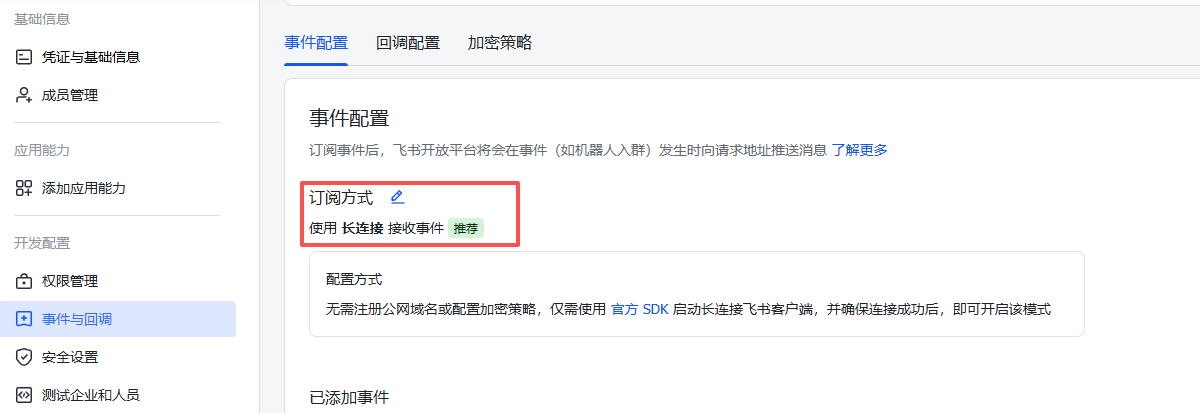
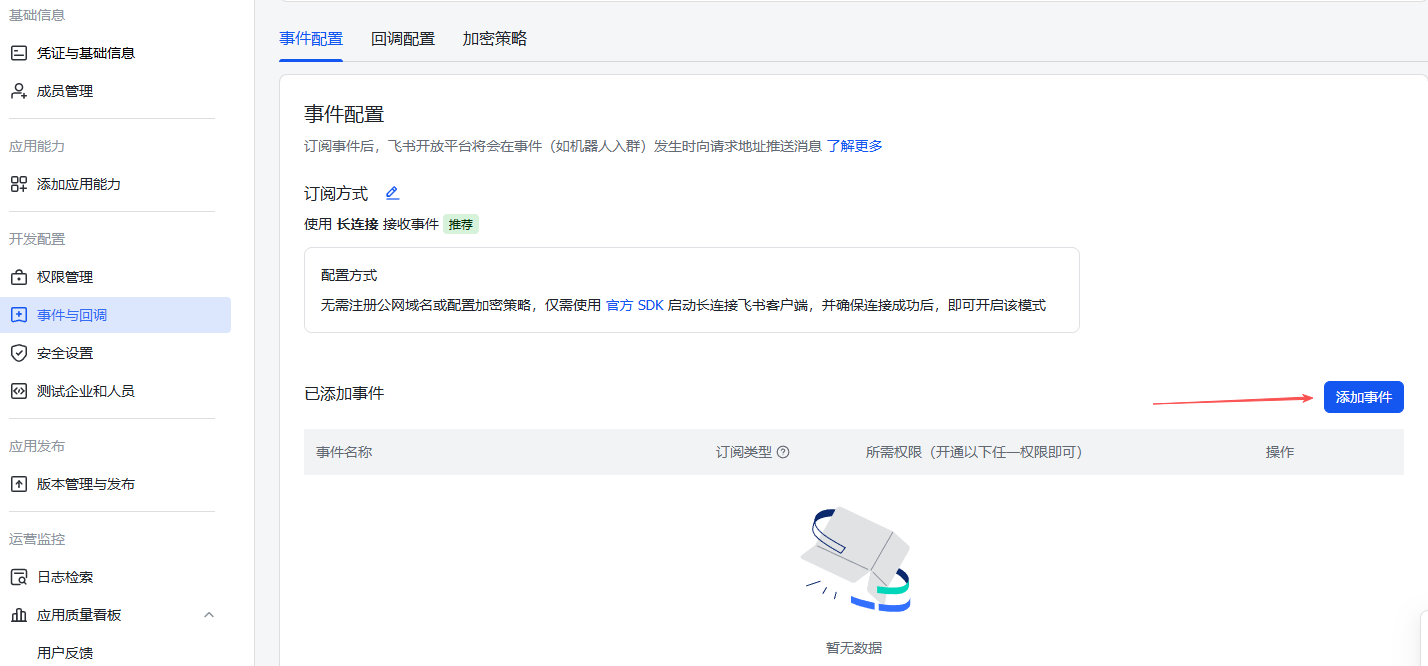
OpenClaw 完成配置后,需要到飞书应用管理-事件与回调,配置事件订阅方式
如果 OpenClaw 是选择 WebSocket,则此处选择长连接,如果是 WebHook 选择开发者服务器
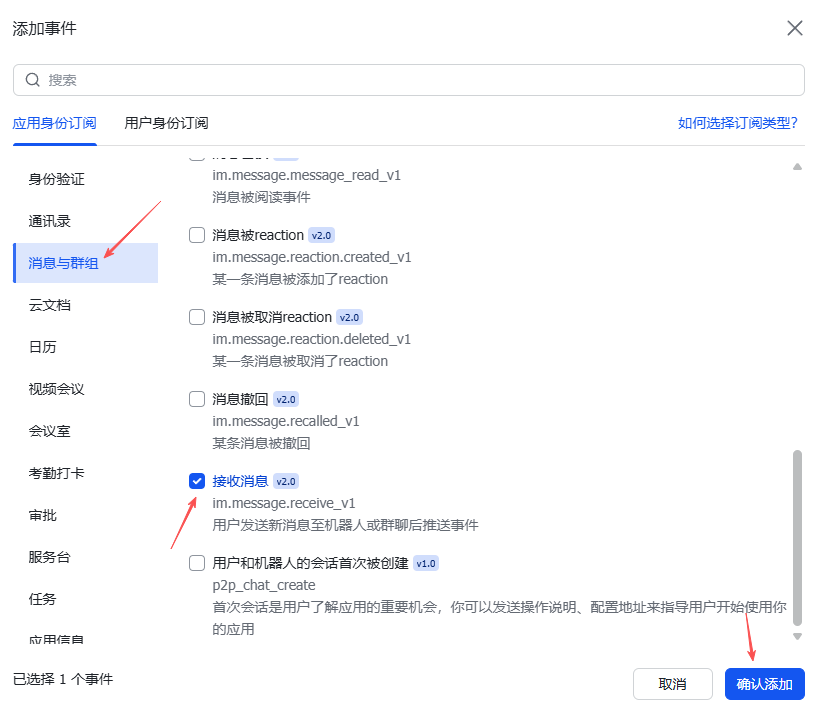
在此界面右下角,点按添加事件,找到消息与群组,勾选接收消息,可能会提示推荐开通权限,开通即可
到应用管理界面-权限与管理,点按批量导入/导出权限,将如下 JSON 复制进导入 JSON,并按下一步并申请开通
{
  "scopes": {
    "tenant": [
      "aily:file:read",
      "aily:file:write",
      "application:application.app_message_stats.overview:readonly",
      "application:application:self_manage",
      "application:bot.menu:write",
      "cardkit:card:write",
      "contact:user.employee_id:readonly",
      "corehr:file:download",
      "docs:document.content:read",
      "event:ip_list",
      "im:chat",
      "im:chat.access_event.bot_p2p_chat:read",
      "im:chat.members:bot_access",
      "im:message",
      "im:message.group_at_msg:readonly",
      "im:message.group_msg",
      "im:message.p2p_msg:readonly",
      "im:message:readonly",
      "im:message:send_as_bot",
      "im:resource",
      "sheets:spreadsheet",
      "wiki:wiki:readonly"
    ],
    "user": [
      "aily:file:read",
      "aily:file:write",
      "im:chat.access_event.bot_p2p_chat:read"
    ]
  }
}更多参考:飞书
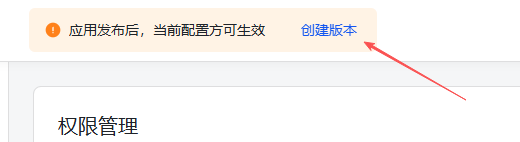
在管理应用界面上方,点按创建版本发布应用
在飞书测试聊天
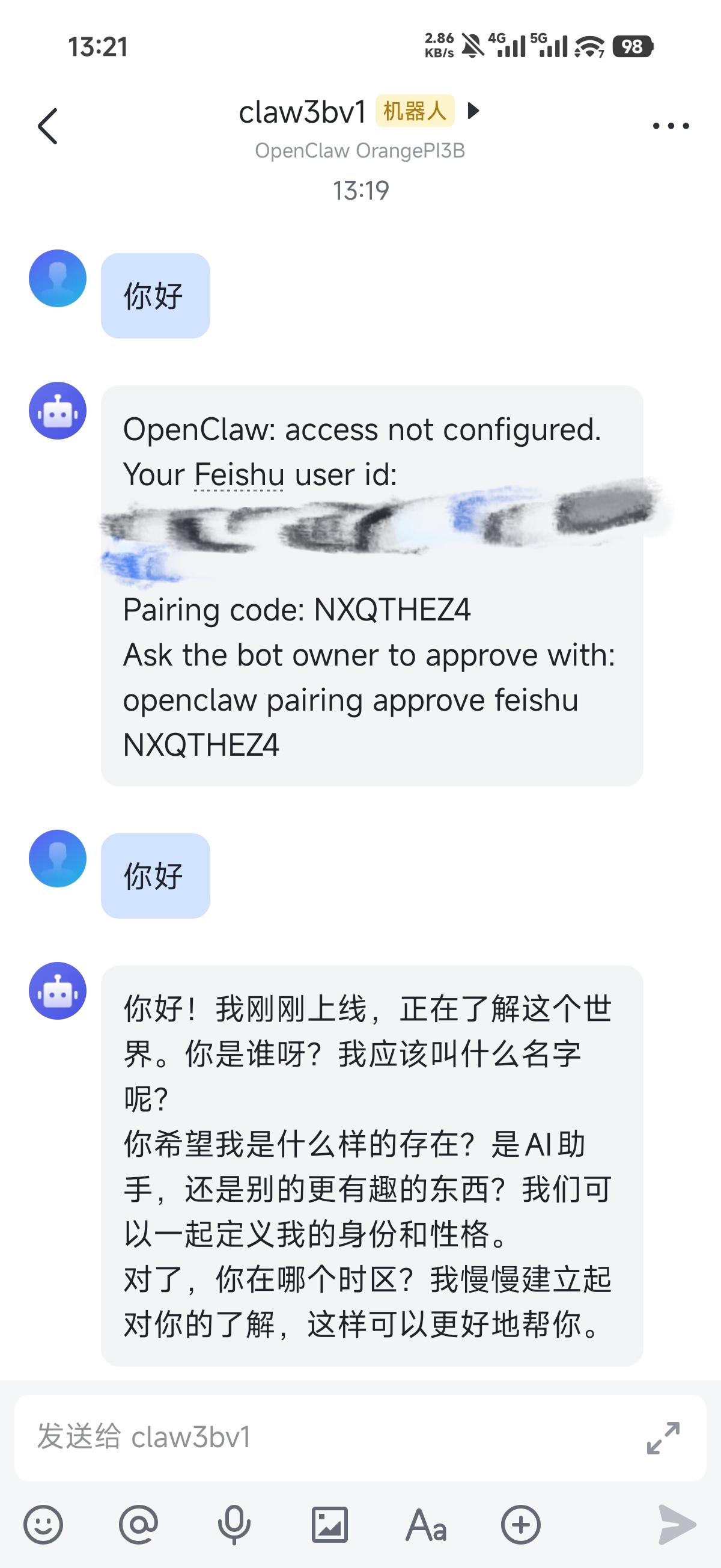
注意:首次使用需要根据指引完成配对
openclaw pairing approve feishu ********